How Is Your Website Actually Ranking?
Short answer: you don't need to guess — free tools will tell you.
No agency required for this part. Start with our own checker — the exact same one we run on this site.

Start With Our Own Checker
We got tired of bouncing between half a dozen different sites to answer one simple question — "is this website actually doing its job?" — so we built a free tool that answers it in one paste: the Local Business Health & SEO Checker. Enter your address, wait under a minute, and get a single report covering:
- Speed — the same Google PageSpeed Insights scores and Core Web Vitals as below, for mobile and desktop. See our Core Web Vitals piece for what the numbers mean.
- Meta tags & social preview — title and description length, a real preview of what your link looks like when shared, and whether your share image actually has a headline or call to action on it, not just a bare photo.
- Local signals — Google Maps link, Google Analytics installed, and (if you enter your town) whether it actually appears in your title, description, and page content.
- Content & trust — an AI review of the things a speed test can't see: is the headline clear, is there a call to action, is pricing indicated, do the photos look real or generic, is there an FAQ.
You can also download the whole thing as a PDF to keep or share. It's free — up to five checks a day, and any one site can be checked twice a day.
What Our Checker Can't Tell You
It's not everything. A few things live behind data only Google (or a paid third party) actually has access to:
- Google Search Console — free, and the only real way to know if Google has actually indexed your pages, what you're ranking for, and whether there are crawl errors nobody told you about.
- Google Analytics — we check whether it's installed, but real visitor numbers are private by design. No tool can show you someone else's traffic, including ours.
- Ahrefs — the free Webmaster Tools tier (one verified site) gives a genuinely useful backlink and site health check. The full paid version is a serious SEO tool, but the price tag is built for agencies and larger businesses, not a small local shop — worth knowing it exists, not worth paying for on day one.
- Facebook Sharing Debugger — our checker shows you the preview, but only this official tool can force Facebook to re-scrape a page after you fix something — otherwise their cache holds onto old previews for weeks.
Here's what that looks like when it's done right: this very site scores 100/100/100/100 on PageSpeed Insights. Click the screenshot for the full report.
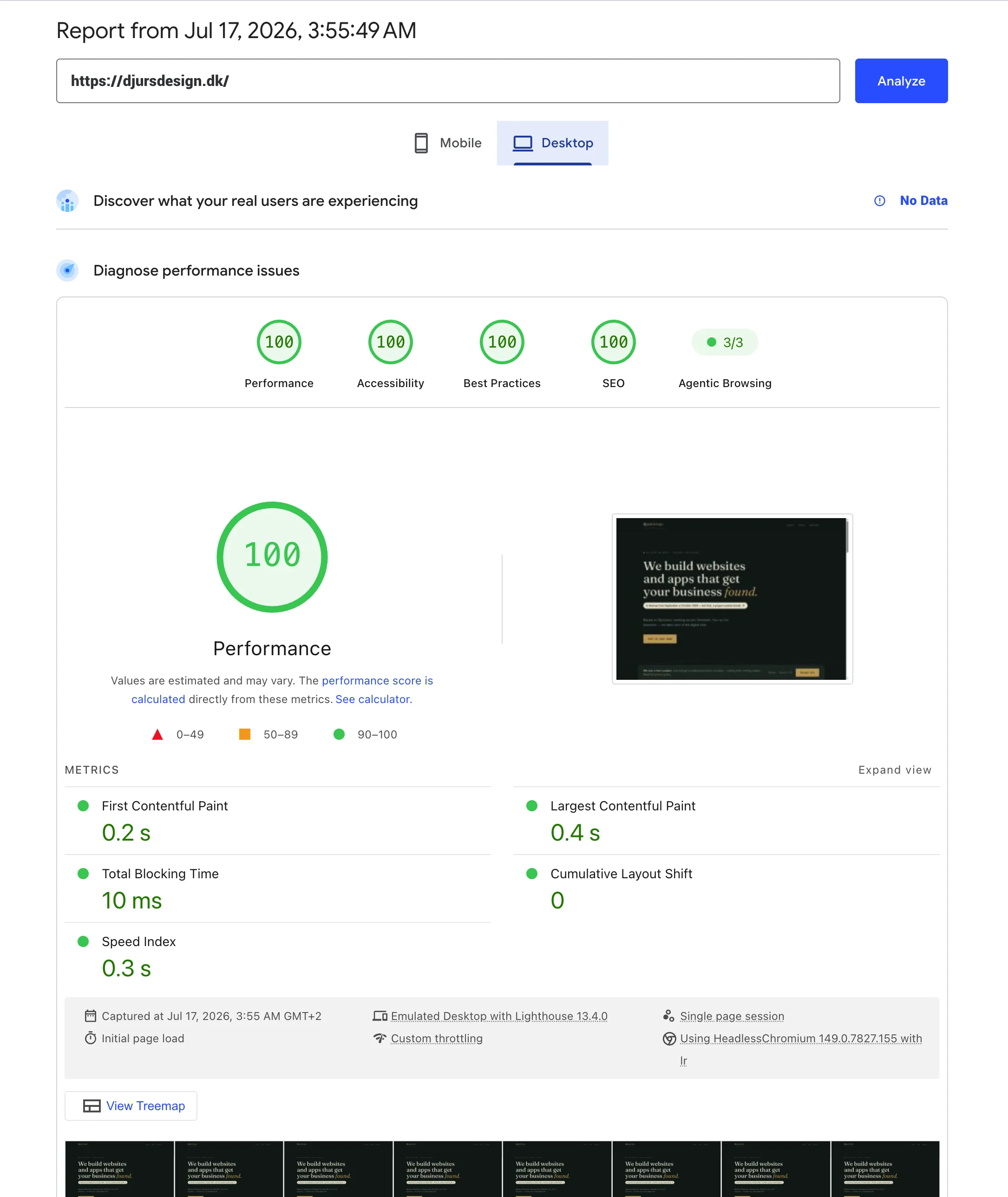
A perfect score like this is realistic for a site like ours — mostly text, a handful of fully optimised images, no unnecessary third-party scripts or plugins. It gets harder the more a site actually needs to do: a shop with hundreds of product photos, embedded video, or heavy ad tracking will trade some of that score for functionality it genuinely needs. 100 isn't the bar everyone should chase — it's what's possible when a site doesn't carry more than it needs to.
What the Numbers Don't Tell You
They'll show you data, not necessarily what to do about it — a low PageSpeed score tells you something's slow, not which of ten possible causes is the real one on your specific site. And good numbers across the board don't guarantee traffic on their own; they remove technical excuses, they don't replace having something genuinely useful to say. One more thing worth knowing: the screenshot above is the Desktop result. Mobile scores are almost always lower for every site — PageSpeed deliberately tests mobile under a slower simulated connection and a throttled processor to reflect real-world phones, not because a site is mobile-unfriendly. A gap between the two is normal, not a red flag.
The honest takeaway
None of this costs anything, and our checker gets you through most of it in under a minute. If something looks wrong and you're not sure what to do about it, that's usually where we come in.